๐ข Free Online Age Calculator
Test your age first before learning Excel!
Learn how to calculate age from date of birth in Excel using DATEDIF, YEARFRAC & TODAY formulas. Perfect for HR, payroll, schools & medical records.
Test your age first before learning Excel!
โ๏ธ By Zain Uddin | ๐ Updated: January 2026 | โฑ๏ธ 8 min read | โญ 4.9/5 Rating
Learn how to calculate age from date of birth in Excel using DATEDIF, YEARFRAC, and TODAY formulas. This complete step-by-step guide covers everything from basic formulas to advanced age calculations. Perfect for HR, payroll, school admissions, and medical records. Try our free online Age Calculator for instant results without formulas.
Do you need to calculate age from date of birth in Excel? Whether you're managing employee records, school admissions, or medical data, calculating accurate age is a common task. Excel offers several powerful formulas to do this quickly and accurately.
The problem? Most people either calculate manually or use complicated methods that break when leap years or month-end dates appear. The solution is simple: use Excel's built-in functions like DATEDIF, YEARFRAC, and TODAY.
This guide will show you exactly how to calculate age from date of birth in Excel, step by step. If you prefer an instant result without formulas, try our free Age Calculator tool โ it gives you exact age in years, months, days, hours, and minutes.
Don't want to write formulas? Use our free online tool to get instant results.
Get your exact age in years, months, days, hours & minutes โ no Excel needed!
๐ Calculate My Age FreeFollow these simple steps to calculate age from date of birth in Excel.
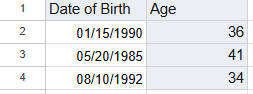
Open Excel and enter the date of birth in cell A2. Use a proper date format like 01/15/1990 or 15-Jan-1990.
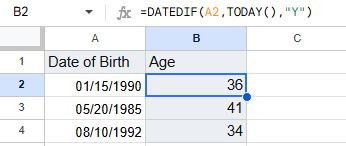
In cell B2, type this formula:
This gives you the age in complete years.
For months: =DATEDIF(A2, TODAY(), "YM")
For days: =DATEDIF(A2, TODAY(), "MD")
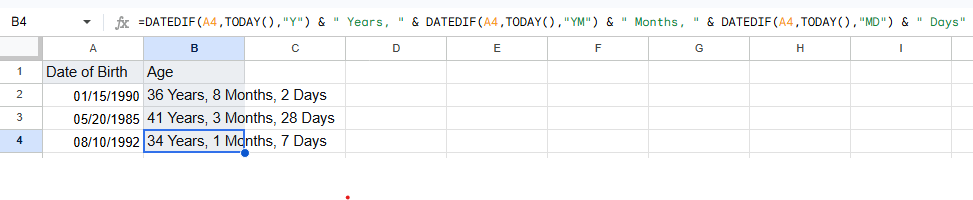
Use this formula to show age as "35 Years, 2 Months, 10 Days":
Drag the fill handle to apply the formula to all rows. Your Excel age calculation is complete.
| Formula | Purpose | Example Result |
|---|---|---|
=DATEDIF(A2,TODAY(),"Y") |
Age in years | 35 |
=DATEDIF(A2,TODAY(),"YM") |
Remaining months | 2 |
=DATEDIF(A2,TODAY(),"MD") |
Remaining days | 10 |
=YEARFRAC(A2,TODAY()) |
Age in decimal years | 35.2 |
=INT(YEARFRAC(A2,TODAY())) |
Age in whole years | 35 |
=(TODAY()-A2)/365.25 |
Quick estimate | 35.5 |
Pro Tip: Use TODAY() for automatic updates. For a fixed date, replace with DATE(2026,1,1).
Calculate employee ages for retirement planning, benefits eligibility, or age diversity reports.
Determine student ages for grade placement or eligibility verification.
Calculate patient age for dosage calculations or developmental milestone tracking. Use our Chronological Age Calculator for medical-grade accuracy.
Verify age for policy eligibility, claims processing, or legal documentation.
Calculate age for birthday parties, anniversaries, or age-restricted events.
| Feature | Excel | Google Sheets | Online Age Calculator |
|---|---|---|---|
| Formula Support | โ DATEDIF, YEARFRAC | โ DATEDIF, YEARFRAC | โ No formulas needed |
| Batch Processing | โ Yes | โ Yes | โ One at a time |
| Automatic Updates | โ TODAY() | โ TODAY() | โ Instant |
| Offline Access | โ Yes | โ Limited | โ No |
| Ease of Use | โ ๏ธ Requires formula | โ ๏ธ Requires formula | โ One-click |
| Best For | Large datasets | Collaboration | Quick single results |
Try our free tool: Age Calculator โ No Excel skills required.
Use =DATEDIF(A2, TODAY(), "Y") where A2 contains the date of birth. This returns age in complete years.
Use the combined formula: =DATEDIF(A2,TODAY(),"Y") & " Years, " & DATEDIF(A2,TODAY(),"YM") & " Months, " & DATEDIF(A2,TODAY(),"MD") & " Days"
DATEDIF is a hidden function in Excel. You can still use it by typing the formula manually. It works in all versions.
Yes! Google Sheets supports the same DATEDIF and TODAY functions. The formula is identical to Excel.
Replace TODAY() with a fixed date: =DATEDIF(A2, DATE(2026,1,1), "Y") to calculate age as of January 1, 2026.
This happens when the start date is greater than the end date. Ensure your date of birth is earlier than TODAY().
Yes, use =YEARFRAC(A2, TODAY()) to get age in decimal years (e.g., 35.42).
Use =TODAY() - (A2 * 365.25) where A2 is the age in years. For more accuracy, use our dedicated Calculate Age From DOB in Excel guide.
=IF(A2="","",DATEDIF(A2,TODAY(),"Y")) to avoid errors on empty rows.DATEVALUE() to convert text dates before calculating.Ctrl + Shift + ; to quickly insert today's date as a static value.Share the Age Calculator with your friends and family!
Calculating age from date of birth in Excel is simple once you know the right formulas. DATEDIF gives you precise years, months, and days, while YEARFRAC is perfect for decimal age calculations.
For quick, error-free results without writing any formula, use our free Age Calculator. It works on any device and gives you instant, accurate age in years, months, days, hours, and minutes.
๐ Try the Free Age Calculator Now
Founder, FreeOnlineTools203.com | Web Developer & SEO Expert
Zain Uddin is the founder of FreeOnlineTools203.com, a platform offering 240+ free online tools across 18 categories. With 3+ years of experience in web development, SEO, and freelancing (Fiverr), he personally builds and tests every tool for accuracy. He is also a published author on Amazon Kindle (KDP).
Expertise: Calculator tools, SEO, article writing, translation, graphics design.